CGPress
  • News
    • General
    • Software
    • Industry
    • Video Games
    • Tech
    • Hardware
  • Articles
    • General
    • Reviews
    • Interviews
  • Tutorials
    • By subject
    • By software
    • Training & Courses
  • Resources
  • Spotlight
    • Reels
    • Films
    • Film Trailers
    • Game Trailers and Art
    • Breakdowns
    • Making Ofs
    • Music Videos
    • CG Videos
    • Images
    • Spots
  • Contribute News
  • News
    • General
    • Software
    • Industry
    • Video Games
    • Tech
    • Hardware
  • Articles
    • General
    • Reviews
    • Interviews
  • Tutorials
    • By subject
    • By software
    • Training & Courses
  • Resources
  • Spotlight
    • Reels
    • Films
    • Film Trailers
    • Game Trailers and Art
    • Breakdowns
    • Making Ofs
    • Music Videos
    • CG Videos
    • Images
    • Spots
  • Contribute News
No Result
View All Result
CGPress
Home Software 3DS Max Plugin News
BulletFX 3.0 – Granular Solver sneak peek

BulletFX 3.0 – Granular Solver sneak peek

by CGP Staff
July 6, 2015
Reading Time: 1 min read
11

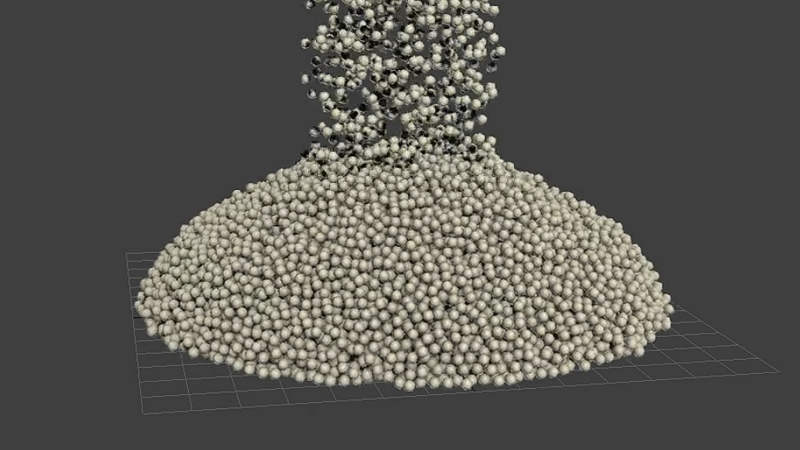
AlphaVFX has posted two new videos previewing the granular solver that will be included in v3.0 of its GPU-accelerated, highly optimized version of the Bullet Physics library for 3DS Max. The Granular Solver can simulate granular effects such as sand and snow. According to the developer, the granular solver “is almost done and the fluids are coming together nicely”. Watch the videos on Vimeo: 20,000 grains–50,000 grains.

RELATED POSTS

SmartAnim advanced rigging for 3ds Max released

3dProject Manager 3.41 released

Miauu releases Layer Colorizer for 3ds Max

More information on BulletFX can be found on the plugin’s website.
ShareTweet

CGP Staff

Related Posts

SmartAnim advanced rigging for 3ds Max released
3DS Max

SmartAnim advanced rigging for 3ds Max released

October 7, 2025
3dProject Manager 3.41 released
3DS Max

3dProject Manager 3.41 released

October 6, 2025
Miauu releases Layer Colorizer for 3ds Max
3DS Max

Miauu releases Layer Colorizer for 3ds Max

October 2, 2025
Ornatrix makes its software free for students and educational institutions
Plugin News

Ornatrix makes its software free for students and educational institutions

October 1, 2025
AnimRef provided in-viewport image sequence playback for 3ds Max
3DS Max

AnimRef provided in-viewport image sequence playback for 3ds Max

September 4, 2025
Free Material Assets Browser for 3ds Max
3DS Max

Free Material Assets Browser for 3ds Max

September 4, 2025
Next Post
Maxtree Plant Models vol.4 for vertical greenery

Maxtree Plant Models vol.4 for vertical greenery

World of Warships open beta trailer

World of Warships open beta trailer

Please read our community guidelines
11 Comments
Oldest
Newest
Inline Feedbacks
View all comments
Joseph Stilnski
10 years ago

Wow this plugin looks amazing! Ive been waiting for a granular solver for ages!

Reply
Mark Whelan
10 years ago

Really admire the work going into this, especially with this comment from them in the description in the second video:

“Development is coming along great getting alot done granular solver is almost done and the fluids are coming together nicely right know my main goal is to basically integrate everything houdini, maya and other packages have into 3dsmax for under $300.”

Reply
MauricioPC
Reply to  Mark Whelan
10 years ago

This guy deserves an award! I would rather use Max than Houdini Maya and others. AlphaVFX for Max president! 😛

Reply
Matt
10 years ago

Are these video examples just spheres falling? Any other videos that really show case a granular solver like the “Sandy” solver in realflow?

Reply
AlphaVFX
Reply to  Matt
10 years ago

I’ll be posting some stuff show casing millions of grains soon.

Reply
Matt
10 years ago

Millions sounds interesting. What about the “Grain” behavior?

Reply
Nildo Essa
10 years ago

I have been following your updates regularly… I just love what i’m seeing :):)…I now plan to buy your tool within this week…but first i need to know a few things..

License

How is the license handled? I have an office where my main workstation is..but every now and then i use my laptop to continue work at home..can i use 1 license for both? as in “deactivate/reactivate on another pc”

Liquids

Up until recently my system units have always been inch even though we use a metric system where i am from..mainly because alotta years ago i read somewhere that max should stay in inches and then use DISPLAY Units to “convert” my units.. i only recently found out that that is not the case and that i should use Centimeters as my system Units…and its making more and more sense to me as we use do mostly architectural renderings and heavy character animation work.

I have always had a tough time simulating a simple glass of water with realflow and what not and interact with my characters because of this system units problem, i always had to scale up or down the sim in order for it to fit my “system units as inch” resulting in simulating more particles than i feel i need to.

How will your tool handle units? will we have scaling issues if a want to sim a river or a glass of water?

Reply
AlphaVFX
Reply to  Nildo Essa
10 years ago

License: A license can be put on both its node locked.

Liquids: BulletFX liquids has its own scaling independent from 3dsmax. I’ve simulated glasses of water. I’ll be putting more videos displaying the solver.

You do realize BulletFX 3.0 isn’t out yet right? Its going to be out later this weekend.

Reply
Major
10 years ago

thanks for developing these tools for max. its on the top of my buy list and looking forward to more demos from you.

Reply
Nildo Essa
10 years ago

Hi..

Yes I know its not out yet…but as you say…later this weekend..thats SWEET!!

All in all..as soon as its out and you show me/us the liquids..im pretty sure ill buy it.. 🙂

when you say node locked…do you mean that we can use 1 license even if its on the same network but not at the same time yes?

Now…about those millions of particles you promised to show ;)…

Reply
AlphaVFX
Reply to  Nildo Essa
10 years ago

I mean node locked as in the same license can be put on 2 different computers.

Reply

Recent Comments

  • Rawalanche on Blender 5.0 released
  • d3d on Autodesk releases 3ds Max 2026.3
  • Damm on Autodesk releases 3ds Max 2026.3
  • Stephen Lebed on Blender 5.0 released
  • d3d on Blender 5.0 released

Popular Stories

  • Autodesk releases 3ds Max 2026.3

    Autodesk releases 3ds Max 2026.3

    0 shares
    Share 0 Tweet 0
  • 3ds Max 2024 now available for download

    0 shares
    Share 0 Tweet 0
  • Blender 5.0 released

    0 shares
    Share 0 Tweet 0
  • Canva reimagines Affinity Studio and releases it free to all users

    0 shares
    Share 0 Tweet 0
  • Unreal Engine 5.7 Preview released with new procedural and material tools

    0 shares
    Share 0 Tweet 0
Facebook Twitter
CGPress

CGPress is an independent news website built by and for CG artists. With more than 15 years in the business, we are one of the longest-running CG news organizations in the world. Our news reporting has gathered a reputation for credibility, independent coverage and focus on quality journalism. Our feature articles are known for their in-depth analyses and impact on the CG scene. “5 out of 5 artists recommend it.”

Recent Posts

  • RealityScan 2.1 released
  • Keyshot 2025.3 Released
  • Silo adds Blender bridge
  • About Us
  • Terms and Conditions
  • Privacy Policy
  • Cookie Policy (UK)
  • Contact Us
  • Contribute News
  • Advertise on CGPress

© 2025 CGPress

Welcome Back!

Login to your account below

Forgotten Password?

Retrieve your password

Please enter your username or email address to reset your password.

Log In

Add New Playlist

Manage Cookie Consent

CGPress uses technology like cookies to analyse the number of visitors to our site and how it is navigated. We DO NOT sell or profit from your data beyond displaying inconspicuous adverts relevant to CG artists. It'd really help us out if you could accept the cookies, but of course we appreciate your choice not to share data. 

Functional Always active
The technical storage or access is strictly necessary for the legitimate purpose of enabling the use of a specific service explicitly requested by the subscriber or user, or for the sole purpose of carrying out the transmission of a communication over an electronic communications network.
Preferences
The technical storage or access is necessary for the legitimate purpose of storing preferences that are not requested by the subscriber or user.
Statistics
The technical storage or access that is used exclusively for statistical purposes. The technical storage or access that is used exclusively for anonymous statistical purposes. Without a subpoena, voluntary compliance on the part of your Internet Service Provider, or additional records from a third party, information stored or retrieved for this purpose alone cannot usually be used to identify you.
Marketing
The technical storage or access is required to create user profiles to send advertising, or to track the user on a website or across several websites for similar marketing purposes.
  • Manage options
  • Manage services
  • Manage {vendor_count} vendors
  • Read more about these purposes
View preferences
  • {title}
  • {title}
  • {title}
No Result
View All Result
  • News
    • General
    • Software
    • Industry
    • Video Games
    • Tech
    • Hardware
  • Articles
    • General
    • Reviews
    • Interviews
  • Tutorials
    • By subject
    • By software
    • Training & Courses
  • Resources
  • Spotlight
    • Reels
    • Films
    • Film Trailers
    • Game Trailers and Art
    • Breakdowns
    • Making Ofs
    • Music Videos
    • CG Videos
    • Images
    • Spots
  • Contribute News

© 2025 CGPress

Are you sure want to unlock this post?
Unlock left : 0
Are you sure want to cancel subscription?
wpDiscuz
11
0
Join the conversationx
()
x
| Reply