CGPress
  • News
    • General
    • Software
    • Industry
    • Video Games
    • Tech
    • Hardware
  • Articles
    • General
    • Reviews
    • Interviews
  • Tutorials
    • By subject
    • By software
    • Training & Courses
  • Resources
  • Spotlight
    • Reels
    • Films
    • Film Trailers
    • Game Trailers and Art
    • Breakdowns
    • Making Ofs
    • Music Videos
    • CG Videos
    • Images
    • Spots
  • Contribute News
  • News
    • General
    • Software
    • Industry
    • Video Games
    • Tech
    • Hardware
  • Articles
    • General
    • Reviews
    • Interviews
  • Tutorials
    • By subject
    • By software
    • Training & Courses
  • Resources
  • Spotlight
    • Reels
    • Films
    • Film Trailers
    • Game Trailers and Art
    • Breakdowns
    • Making Ofs
    • Music Videos
    • CG Videos
    • Images
    • Spots
  • Contribute News
No Result
View All Result
CGPress
Home Software 3DS Max Scripts
3DS to After Effects script

3DS to After Effects script

by Paul Roberts
May 30, 2016
Reading Time: 1 min read
3

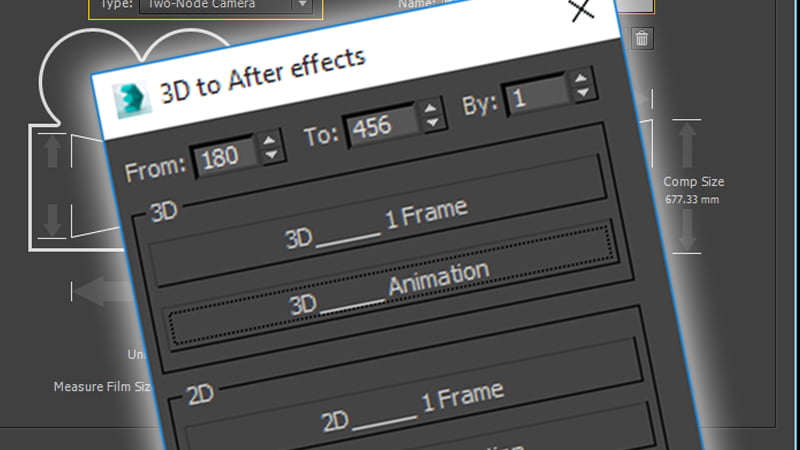
A simple but handy free script by Mandegar Design that allows you to copy and paste camera and object position and animations from 3DS Max to After Effects with options for full 3d or 2d screen space tracking. Read more on ScriptSpot.

RELATED POSTS

3D Measure Master adds CAD-style measurement tools to 3ds Max

Miauu Layer States for 3ds Max

Miauu’s Slate Material Cloner

ShareTweet

Paul Roberts

Paul is the owner and editor of CGPress, an independent news website built by and for CG artists. With more than 25 years in the business, we are one of the longest-running CG news organizations in the world. Our news reporting has gathered a reputation for credibility, independent coverage and focus on quality journalism.

Related Posts

3D Measure Master adds CAD-style measurement tools to 3ds Max
3DS Max

3D Measure Master adds CAD-style measurement tools to 3ds Max

October 27, 2025
Miauu Layer States for 3ds Max
3DS Max

Miauu Layer States for 3ds Max

September 23, 2025
Miauu’s Slate Material Cloner
3DS Max

Miauu’s Slate Material Cloner

September 9, 2025
AnimRef provided in-viewport image sequence playback for 3ds Max
3DS Max

AnimRef provided in-viewport image sequence playback for 3ds Max

September 4, 2025
Free Material Assets Browser for 3ds Max
3DS Max

Free Material Assets Browser for 3ds Max

September 4, 2025
IFC import plugins for Autodesk 3ds Max
3DS Max

IFC import plugins for Autodesk 3ds Max

May 15, 2025
Next Post
Belarusbank, “Evolution”

Belarusbank, "Evolution"

Layer Storage

Layer Storage

Please read our community guidelines
3 Comments
Oldest
Newest
Inline Feedbacks
View all comments
Adam Walker
9 years ago

Though I praise (and appreciate) the author’s sharing, it seems like a “poor man’s” version of Boomer Labs’ fantastic Max2AE tool.

Personally, I would encourage people to seek out Boomer Labs’ Max2AE tool. We have been using it for over 8 years and it has paid for itself MANY times over.

Boomer Labs (BL) have been a fantastic developer of 3dsmax tools for many years and deserves the professional community’s support for developing such useful tools.

FYI: There is ZERO financial association between me and BL -aside from I have purchased several of their plugins.

Reply
Nicolas Caplat
Reply to  Adam Walker
9 years ago

Hello,

Sorry, but your post does look a little bit like some Boomer Labs promotion 😉
MAX2AE is good for sure, but pretty expensive IMO. You also have AfterFX Data Exporter (free, http://www.scriptspot.com/3ds-max/scripts/afterfx-data-exporter) and Nyx Voltron (free for a while, http://www.ycdivfx.com/nyx-voltron/). And not to forget the one that brings us here … really I don’t find your answer very appropriate, saying “hey mate, your script is good, but crap compared to another …”. It can be very useful for people using AE occasionally, thus avoiding to put too much money in such a 3dsmax->AE bridge.

Reply
Marco
Reply to  Adam Walker
9 years ago

I would definitely give it a try, but CS6 is not supported anymore.

Reply

Recent Comments

  • Rawalanche on Blender 5.0 released
  • d3d on Autodesk releases 3ds Max 2026.3
  • Damm on Autodesk releases 3ds Max 2026.3
  • Stephen Lebed on Blender 5.0 released
  • d3d on Blender 5.0 released

Popular Stories

  • Autodesk releases 3ds Max 2026.3

    Autodesk releases 3ds Max 2026.3

    0 shares
    Share 0 Tweet 0
  • 3ds Max 2024 now available for download

    0 shares
    Share 0 Tweet 0
  • Blender 5.0 released

    0 shares
    Share 0 Tweet 0
  • Canva reimagines Affinity Studio and releases it free to all users

    0 shares
    Share 0 Tweet 0
  • Unreal Engine 5.7 Preview released with new procedural and material tools

    0 shares
    Share 0 Tweet 0
Facebook Twitter
CGPress

CGPress is an independent news website built by and for CG artists. With more than 15 years in the business, we are one of the longest-running CG news organizations in the world. Our news reporting has gathered a reputation for credibility, independent coverage and focus on quality journalism. Our feature articles are known for their in-depth analyses and impact on the CG scene. “5 out of 5 artists recommend it.”

Recent Posts

  • RealityScan 2.1 released
  • Keyshot 2025.3 Released
  • Silo adds Blender bridge
  • About Us
  • Terms and Conditions
  • Privacy Policy
  • Cookie Policy (UK)
  • Contact Us
  • Contribute News
  • Advertise on CGPress

© 2025 CGPress

Welcome Back!

Login to your account below

Forgotten Password?

Retrieve your password

Please enter your username or email address to reset your password.

Log In

Add New Playlist

Manage Cookie Consent

CGPress uses technology like cookies to analyse the number of visitors to our site and how it is navigated. We DO NOT sell or profit from your data beyond displaying inconspicuous adverts relevant to CG artists. It'd really help us out if you could accept the cookies, but of course we appreciate your choice not to share data. 

Functional Always active
The technical storage or access is strictly necessary for the legitimate purpose of enabling the use of a specific service explicitly requested by the subscriber or user, or for the sole purpose of carrying out the transmission of a communication over an electronic communications network.
Preferences
The technical storage or access is necessary for the legitimate purpose of storing preferences that are not requested by the subscriber or user.
Statistics
The technical storage or access that is used exclusively for statistical purposes. The technical storage or access that is used exclusively for anonymous statistical purposes. Without a subpoena, voluntary compliance on the part of your Internet Service Provider, or additional records from a third party, information stored or retrieved for this purpose alone cannot usually be used to identify you.
Marketing
The technical storage or access is required to create user profiles to send advertising, or to track the user on a website or across several websites for similar marketing purposes.
  • Manage options
  • Manage services
  • Manage {vendor_count} vendors
  • Read more about these purposes
View preferences
  • {title}
  • {title}
  • {title}
No Result
View All Result
  • News
    • General
    • Software
    • Industry
    • Video Games
    • Tech
    • Hardware
  • Articles
    • General
    • Reviews
    • Interviews
  • Tutorials
    • By subject
    • By software
    • Training & Courses
  • Resources
  • Spotlight
    • Reels
    • Films
    • Film Trailers
    • Game Trailers and Art
    • Breakdowns
    • Making Ofs
    • Music Videos
    • CG Videos
    • Images
    • Spots
  • Contribute News

© 2025 CGPress

Are you sure want to unlock this post?
Unlock left : 0
Are you sure want to cancel subscription?
wpDiscuz
3
0
Join the conversationx
()
x
| Reply